Showing posts with label Game design. Show all posts

Friday, September 26, 2014

Pandemic - Board Game Analysis 2

This week me and my group played another board game and here is the analysis of that game.

The game we chose was Pandemic. It’s played by 2-4 players. The goal of the game is to fight diseases and find cures for them. When all cures are found you win the game. This is done together with the other players where you help each other fighting outbreaks around the world. You play on earth and can move around to different cities in the world. The cities in the world are colored in four different colors. Each color also has a disease with that same color. Before the game start some disease cubes are randomly placed on the board on locations on the infection cards that are drawn before start.

How it’s played

The characters

Each player randomly gets one type of character card describing your special abilities at the start of the game. Those are the scientist, medic, researcher, dispatcher and operational expert. You can see their special abilities in the pictures. So a player can’t choose the role he or she is most comfortable with. This makes the game fair in the way that all get the same chance to play a certain role.


One turn


It’s a turn based game and you have four actions per turn. You can choose to use your actions how you wish. You can move in different ways, fight disease in an area, build a research station, discover a cure or share your knowledge (share cards with other players). How you can play these actions depend on the cards you hold and also your special abilities.

After you have done your actions you draw two player cards which can contain three types of cards, a city card with a color connected to that city, a special event card that basically is a special power card that can be used one time and the epidemic card.

If there are no player cards left in the pile the game is lost.

Then you draw a number of infection cards (depending on the infection rate) The cards show a city and a color and you place one new disease of that color in that city for each card.
If there not enough cubes left to place on the board the players lose the game.
 
City card

The city card has a color and a city name of it. By using this card a player can fly to that location using an action point or the card can be saved for creating a cure for the disease of cards color later on. You can also give these cards to other players. 

Special event card

The special event card can be used any time even if it isn’t your turn and they are all different. With one you can create a research station anywhere in the world, another let you fly a player to any city in the world and so on. 

Epidemic card

If you get the epidemic card some special things happen. First the infection rate is moved one step which might result in the players having to draw more infection cards every round. You then draw a card from the bottom of the infection card pile and place three disease cubes in that city and you then reshuffle all the played infection cards and place them on top of the infection card pile. This will make it so the played infection cards will soon be played again resulting in disease cubes popping up in same cities once more.  This together will easily lead to outbreaks. 

Outbreaks

Outbreaks occur when a disease cube needs to be added to a city and the total amount of cubes in that city exceeds three. Then the disease spread to all adjacent cities with one cube in each of those cities. If one of those cities also exceeds three you get a chain reaction of outbreaks. That’s bad and can make you lose the game quickly because if you get more than seven outbreaks totally in a play through everyone loses the game.


Cures

You can create a cure if you got five cards of the same color and you are in a city with a research station. (The scientist only needs four cards) That disease can after it's been cured be removed by the medic without using action points. When all cubes of that color is removed from the map that disease will never be able to come back and is cured forever.

To win the game you have to create the cure for all four diseases. All disease cubes don't have to be removed though.


The Core system

The core system of this game is moving around the board and removing disease cubes. New disease cubes are placed on the board depending on the epidemic cards and the infection cards. Your job is to treat the infected areas as soon as possible to prevent outbreaks at the same time you need to find a way to create a cure for that disease.

To find a cure you need to constantly have a dialog and work together with the other players. You need to share cards of the right color by being in the same location or maybe build a research station close to a scientist so he can create a cure there. And as a dispatcher you can move around other players so they can meet up in the right place and so on. All the actions a player can do in a turn is shown on the pictures below.


The Good

The balance of the game is amazing. It’s really nerve wrecking. We played a bunch of times and we only won one time but we almost won all other times. Most of the times we were basically only one turn from winning the game. We all found the game entertaining and well balanced. If the game would have been too easy I believe we would only play once or twice and then get tired of it but because it’s so difficult it makes you want to play again and again. You want to beat the game.
When we all learned how to combine our strengths the game got easier and alot more options and strategies were available to us. 

The Bad

This is a tough one. I like the game as it is. I think that the game is very well balanced and I like the core mechanics and how the players need to interact with each other. If I need to think of something that is bad I would say that the player cards are a bit boring. There is not much that happens when you take two player cards except for the epidemic card. I think as an improvement to the game they could add some spice by adding some more random events and story to the player cards or maybe just some more special event cards.  

Interesting system

For me the most interesting system is the randomness of the player characters and the ability to find a cure together. The different attributes of the characters and the way the players constantly need to keep talking strategies to each other to be able to find a cure in time makes this game really interesting. You also need to constantly adapt to the situation. Do I choose to remove some disease in the city where I am or do I help my fellow player the scientist by meeting up with him and sharing knowledge so he can find a cure so the medic in his turn can cure an area from disease. The game is a nice social gaming experience. The cooperative game play is really a breath of fresh air compared to most other games out there where you compete to win against the other players.

To be able to beat this game you need to really learn how to use the strengths of your characters and work together and I believe this is what makes this game so interesting. After playing a few times we saw solutions to certain problems in other ways then just individually moving to a place and removing the disease in that city. The dispatcher for example is really powerful when you learn how to use him in the correct way. He can move other players around the world so they can meet and share cards and so they come up with a cure just in time before the game ends.

Target Group

On the box it says 10 years and up and I believe that’s quite fitting. For young players this can be an educational experience and also at this age I believe the children can start to understand the cooperative parts of the game. I believe that this game aim for a broad group of players at all ages. This is not the game for the competitive person but more so for people who are more of a socializer that likes helping others instead of always winning.


Summary

The game is quite easy to learn and setup. You learn to play it instantly but it takes time to master. It’s when you realize that the more you work together the better the results will be and the higher the chances are for you all to win. Adding so the characters can’t be chosen but are drawn to give some randomness makes you rethink your role in the team. Some players who might have played one role know how to play that good. When they are given another role they then need to rethink when playing. This adds replayability to the game, this and the difficulty level. When you win the game you can increase the difficulty by adding more epidemic cards into the player card pile. This game is nerve wrecking and you feel you are about to win when you suddenly get a chain reaction of outbreaks just messing up your plan and making you all lose the game just before you were about to win. A game takes about 45 minutes to play and I would recomend this game to people who want to try something different.

Friday, September 12, 2014

Small World - Analysis

Last week we were assigned to play and analyze a board game of our choice in the course, Advanced game design. My group chose Small world and here is my personal analysis of the game.


The game

Small world is a turn based strategy game where your goal is to collect coins by conquering and holding areas of a map. You get coins depending on a number of different things like how many provinces you hold and you can also get bonus coins depending on your racial and special power abilities. The player with the most amounts of coins after a set number of turns win the game. The game can be played by 2-5 players and depending on the number of players the board that the game is played on is different and so is the number of turns.

Choosing a race combo

You start out with five coins. At the start of the first turn you can choose or buy a race you want to play. With the race there is also a special power card connected. The races you can chose from are random and so are the special power cards. From the deck with the races and power cards only the top five are placed on the table. (see picture below)

The first is free to pick. The second race cost one coin and the third two coins and so on. All the placed coins by previous players will become yours if you choose a race card with money on it. This is probably developed in such a way so if you are not allowed to go first you can choose a race with all the coins from previous players giving you some bonus for your start. And it’s not a bad bonus since the game is about getting the highest amount of coins before the end of the game.


Conquering

Now you have your race and are ready to go. Depending on the race and power card combo you’ve chosen you get a number of tokens that you can place on the map to conquer new areas. If you look at the picture below you see these big numbers in the lower corners of each card. this represent the number of tokens you are allowed to start with. So if I would choose Fortified Amazons I would get 6 tokens for being Amazon and then 3 more tokens for the special power card Fortified. And being Amazon also grants me 4 extra tokens that I can use when I'm conquering but that have to be removed from the board when my turn is up.


An empty province costs two tokens to conquer. An occupied province cost the original two tokens + one extra token for each unit occupying that space. When you have used all your tokens and conquered as much as you can, you can redeploy your tokens on the conquered provinces to increase the defence in certain positions. You then count your score and receive your coins depending on the number of provinces and special abilities you have. In this case my race won't give me extra coins but I have the ability to build a fortress each turn and that increase the defence in that area by one but also gives that province one extra coin per turn. So I would naturally do that. When I'm done the turn moves on to the next player. When the last player is done the game moves on to the next round.


Here on the picture to the left you see tokens of skeletons on the board. conquering this province would need two for the basic cost and then four extra tokens, one for each skeleton. At the end of the turn if you not have enough tokens to conquer a province you can chose to gamble with the special dice that comes with this game. The dice have three empty sides and when rolled you can get 1-3 extra tokens for that attack only.

Using your race to your advantage

If you want to win this game it’s quite important to play your race correctly. For example if you have Fortified Humans you get a bonus to holding farmlands so you should conquer as many farmland provinces as you can and try to fortify yourself there. Building forts and holding farmlands gives you extra coins.

On the other hand, if you have the Pillaging Ratmen your tactics should be to conquer as much as you can as fast as possible because you don’t have any other special abilities with your race other than the big numbers of tokens and the power card bonus for pillaging which gives a bonus to conquering .The next step would be turning your race into decline.

Turning your race into decline

In the start of each round you can choose to keep conquering and collecting coins or you can turn your race into decline. When you turn your race into decline you flip over your race card, special power card and all placed tokens on the board.

You can no longer use this race to conquer new provinces but you still get one coin for each province your declined race holds at the end of your turn. Then the next round you get to choose or buy a new race to play and you will get coins from both the declined race and the active race. The ability to turn your race into decline is really one of the things that make this game special. Comparing this to a normal game of Risk (http://en.wikipedia.org/wiki/Risk_(game) ) where if you lose the last troops you control you will be out of the game. Well here you get a fresh new race and can begin conquering all over again.

Here is where the strategy of this game comes in. Timing the turn you go into decline can be crucial for your success in winning this game. If you overextend and ignore going into decline you will soon have your forces spread thin and you will be an easy target by other players and will quickly lose income. Also turning into decline at the right moment to be able to choose a new race with a powerful power card combo before your opponents is able to do the same is a game changer. You can go from losing the game to almost winning the game in a few turns.

The Good - Randomness

As I’ve just mentioned the ability to go into decline is really a great thing about this game. Another good thing about this game is the randomness of the races and how you get to pick a race. Each game is different because you and your opponents will have different race and power card combinations to choose from and you will have to apply different strategies each time you play this game all because of the different race combos available. Combining this with the decline system is what gives this game a unique feel with great replay value.


The Bad - Overpowered combinations

The only downside of this game that I can think of is that it sometimes lead to some combinations of race and power cards to come up that are really overpowered and with some luck one player can manage to get one powerful combo after another leading him to victory leaving a feeling of unfairness.

For example one round we played I had just finished conquering around seven provinces when another player picked a new race and steamrolled all over my province and conquered it all in one turn.

Also sometimes the rules weren't exactly clear on how some abilities was supposed to work so we had to fill in with what we felt worked best. It was only minor things and nothing game breaking.

Who this game is for

It says on the box that the game is for ages eight and up which is very broad. I believe this game is aimed towards people who enjoy strategy games but don’t have a lot of time to play too deep and complex games. This game is easy to learn and you can just pick it up and play but when you play it a few times you soon realize that there are some strategy involved here that can tip the scale in your favor. 

I myself am a strategy fan and it was a long time since I played a board game and I really liked this game. The game itself took around one and a half hour to play and it felt like an okay length for a game. This game could easily be played by a family with the father of the family having the interests in these kinds of games or by a group of friends meeting an evening to hang out.
So I believe the biggest target group is male in his 20- 40s with interests in strategy type of games. The secondary target will be friends and family of that individual.


Summary


At first glance this game looks complex but it’s quite easy to learn. It’s very easy to play with the hardest thing being to remember to count your score after each turn. It has some unique features like the system of going into decline and picking a new race to play which makes it a game where all players can play to the finish without being eliminated like in a Risk game. 

The way that this game also combines the randomness of the races together with the decline system really makes this game shine by forcing the player to always adapt to the game and planning your strategy well and then if a new racial combo appear, you have to rethink your whole strategy for the next round because everything changed. Overall I think this is a good game with light strategy elements to it. 

Friday, February 14, 2014

Project Aurora, post 4

Today our group met with our teacher Marcus for a pre-alpha screening and chat how things are going in the project. We didn't get any negative feedback and he thought we were right on track....phew!
After the meeting I went straight to work and now with some more fun stuff. Player mechanics!...I also moved alot of code though.

I started adding some methods for an attack/dash move on the player so it moves more fluently when attacking and not teleports from on spot to another. I will work more on movement, attack and a sneak mode we have to lure in fish. All these are very important to the feeling of the game so they will need alot of attention.

Here is a code snippet of the dash/attack so far:


First I check that we are in the Dash state with help of the enums I created earlier. Then I check what direction the player is facing so the dash will happen in the right direction.

Then the actual movement is set in the velocity variable with a call to the function to SetVelocity();

After that the dashpower is increased until a certain point. then it starts slowing down.

When the dashtimer reach 0 the dash stops. I will add later that it also stops when you hit a target.

So now I can play around with the dash timer and power to change the movement of the attack to for example fast in the begining and then slow in the end or the opposite if i like. This needs alot of testing so it will match the feeling we want to capture in game.
I will probably start making these different player actions to private methods/functions instead that are called in the player update function. I will make them private so they can't be called outside the playerobject somewhere else in our code.

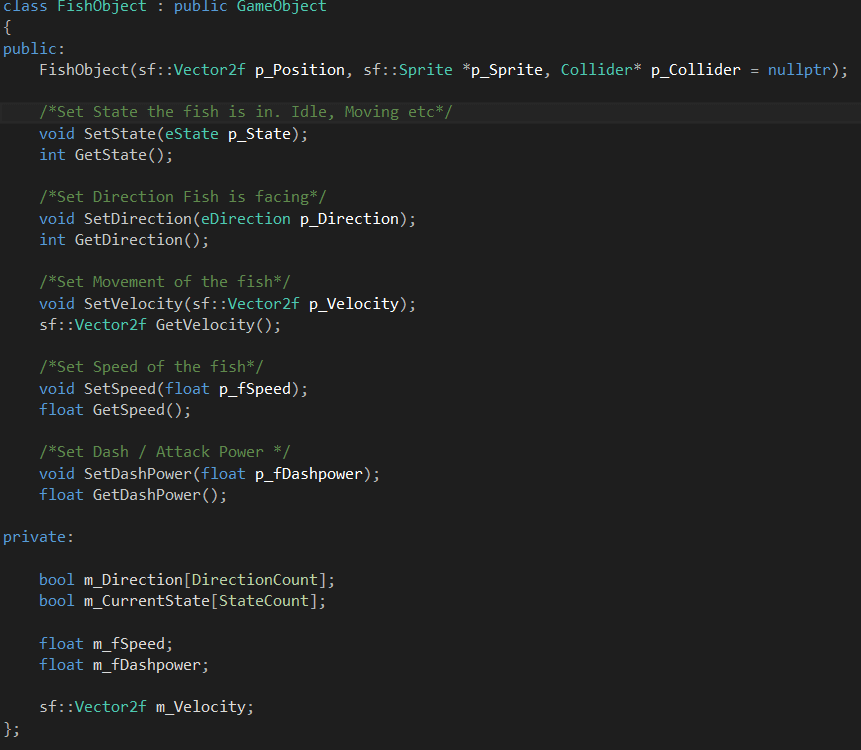
I also brought a class back to life! Our FishObject class Viktor made. I remade the whole thing and made it inherit from our Gameobject class. The PlayerFish and all other fish will then inherit from this FishObject class.

Here is part of the .h file. some things got cut out from the screenshot on top like the 2 enums direction and state I added the other day. This is the basic outline all fish will have. I will build more on this class I will likely add something for animations here as well since all fish will probably be animated.


I also added so the player sprite flips when moving left or right and I had to set the center of the sprite as origin. Otherwise the sprite flipped based on the upper left corner of the sprite creating a fixed flip? like when you flip a domino. but the result we want is like flipping a pancake, does that make sense?

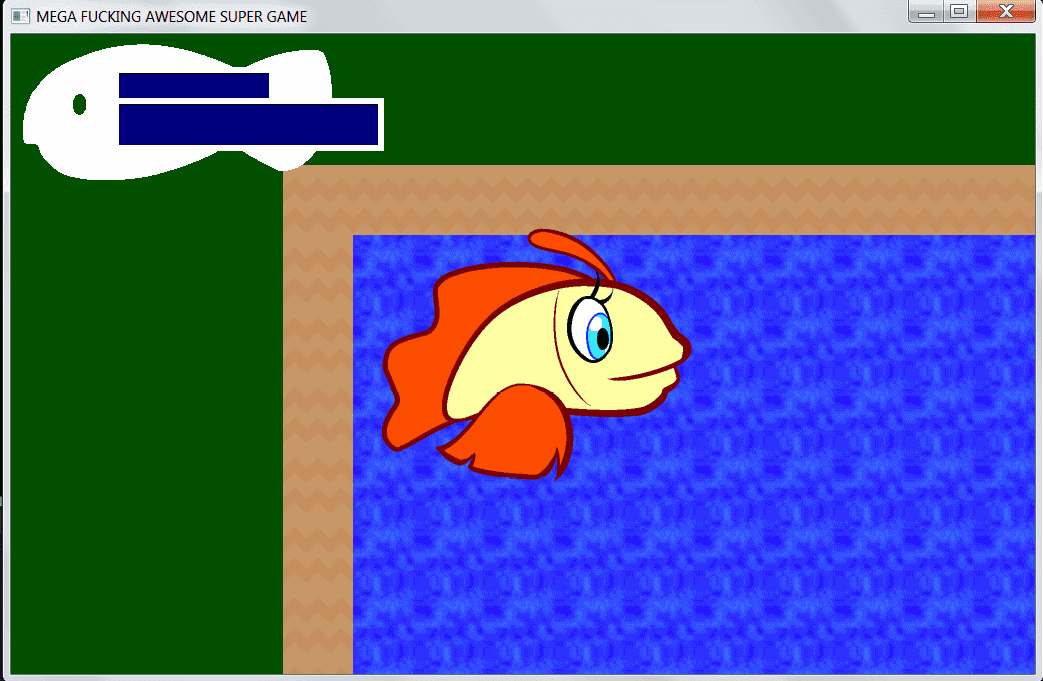
Here is a screen of the latest progress so far:

My groupmate David added the GUI in the top left corner and we also put in the player sprite / Idle animation. Right now its a little too big but it will be resized soon.

Thats it for today.


Tuesday, February 11, 2014

Project Aurora, post 3, Things are happening!

I have been doing alot of programming and no blogging so I will try to catch up now.

On last sunday I did alot of changes in the code. For better and worse.
I moved all inputs checks from all GameStates handleInput functions and the core file  to the InputManager's UpdateEvent function that Oscar wrote. The group didn't like it and moved it back the day after.
I also changed how the draw function was called within the different states update function to let the actual statemanager handle the call shown in the example below.

It looked like

Gamestate::Update
{
  HandleInput();
  Draw()
}

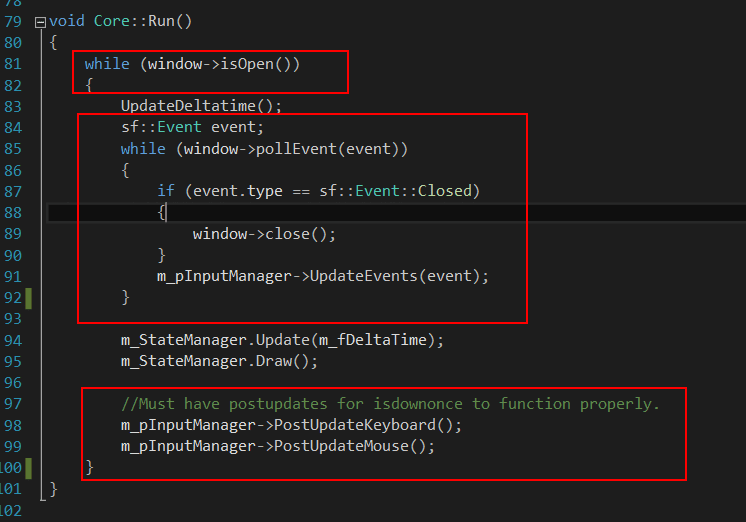
I moved the draw to be called from the core/main loop like picture on the left side. m_StateManager.Drawn()

I also changed the StateManager to a pointer put that wasn't liked by the group either so that was also changed back.

All in the red squares is what I  moved out of the game loop and I wanted it to be called only in the State where its needed. I lost that battle as well.

I started making all these changes when I noticed that I couldnt get animations to work and I soon realised that I was missing an important piece......time!
So I started thinking of how to Implement it. I knew there was a sf::Time and a sf::Clock class. I have been in contact with them before I started studying like 2 years ago when I just played around with sprites using SFML.

So I looked at Tommi Lipponen's (our teacher) code from a C++/SDL project and I tried to translate that to SFML library and I ended up with the code to the right.

So what it does is it sets a sf::Time object to zero and then get the time passed since last iteration and restarts the clock.
Clock.restart() returns time as well as restarts the clock so its quite handy. I then give the collected time to a float variable called m_DeltaTime that is used throughout the game for updating positions and so on. I also check so m_DeltaTime not get bigger that 0.1. if it does it is set back to 0.1.
I also added a vertical sync on the window just after the window is created (not shown here) to limit the frames to around 60 frames / second so the If-statement here is probably never needed. its just a safety net.

With this in place I started working with adding animations to the player.
First I created an Animation class that inherits from sf::Sprite class. I also added a LoadAnim function so animations is loaded with the SpriteManager and I then add the animation to the playerobject.
How all this happens is still under construction so I will go deeper into how it works next time I blog because I am changing alot in the code now and I have to figure some things out first. like how to add many different animations and how to set which one is playing.

I did some small changes in how the GameObjects and updated and drawn.
I also decided to seperate the player from other GameObjects after some talks with fellow students and our teachers. The reason is because the player differ so much and its just silly to store it together with everything else.

I added movement to the player and also added so that a camera is centred on the player and follows player movement. I will probably play around with that so it behaves less fixed to the player after som tips from Linus (third year student and counselor to us newbies)

Last night after the animations, movement and camera was in place I pushed it up to Github so my group members could take part of it. After that, one of my group pushed his changes as well and because we had been working on almost two different versions of the project it caused major mayhem. Bunch of conflicts and crashes! Visual studio didn't even open. It felt like all was lost. Luckily we have a Github genius in our group ->David  . He fixed it all in about 2 hours and we were up and running again today at lunch time....phew!
Lesson learned.......commit, push and pull things to Github way more often to prevent people working on versions that differ too much. Everything flows more easy this way.

So today:

We got everything to be drawn out at the writing of my last blogpost but it wasn't handled so good. It took between 2-5 seconds for things to be drawn to screen after the GameState was entered.
I knew it had something to do with how the SpriteManager worked. I knew it was a pointer problem and I tried a 1000 different things with pointers everywhere! Today I asked my teacher(Tommi mentioned above)
and he said it was an SFML thing and looked at my code. He found the error in 1 second. A problem I have been sitting with for days! it was right infront of me but i missed it.

So I changed this row in the SpriteManager.h file and made the Texture element in the map a pointer.


I had done that already and all changes in the pictures below as well but It only gave me white squares instead of sprites when I did it...I was about to lose it! Thats when I asked Tommi.


The only thing I missed was whats in  the red square. (new sf::Texture) with that in place it all worked so great!. I would probably have solved it eventually.....I was so close. But Tommi saved me a few days of headache. Thank you!

I then started working on the PlayerObject some more. trying to figure out animations and keeping track of movement. I added 2 different Enums. One that will keep track of the player state. Idle, Moving Dash, Eat, and so forth and one to keep track of the direction the player is moving.

I added an easy dash mechanic that makes the player  dash forward a few pixels when spacebar is pressed. I will keep working and fine tuning movement and animations to the player the following days. So I will get back to you on the next blog on how that works out.

Here is latets screen of our game so far: Player and Camera movement in place as well as animation.


(animation not show in the screenshoot....duh!)

Friday, February 7, 2014

Project Aurora, post 2 (Blog Assignment 1)

So we have laid down some plans for the game which we based our SCRUM on but we haven't finished the design document yet. This is causing some smaller problems. It's been kind of hard to organize the programming of the game. Who will code what and when does it need to be finsihed and what does it need to have.
Result is that we have been doing some unnecessary things. I had to redo the whole GameObjectManager and the Sprite and FishObject class that Viktor made was removed from the project.

The other day we met with our game design teacher Adam Mayes from our other class of game design we had last autumn. He gave some feedback on what we had and we all realised that our aestethic goal  was not the one we had planned for in our SCRUM. So he guided us in the right direction and I felt the group became more focused on what we needed to do after that meeting. Our main aestethic goal now will be challange and not exploration/discovery that we had planned.

One of the assignement in the course Introduction to game development is to write six blogposts where i need to reflect on one artefact/feature i made during the week. so this week I merge this post together with the game programming course that we have in parallel to game development.

So this week and last week I've been working on the GameObjectManager class. This class will handle all the game objects in game. I chose to write about this one because its been giving me most grief the last two weeks. 
First i designed and wrote the code for this so all different objects are stored in their own container (C++ vector class.)  like this:

PlayerFishObject *m_pxPlayer;
LightObject *m_pxLight;
std::vector<TerrainObject*> m_apxTerrain;
std::vector<EnemyFishObject*>  m_apxEnemy;
std::vector<PowerupObject*>  m_apxPowerup;
std::vector<InfoObject*>  m_apxInfoObject;
std::vector<TrapObject*>  m_apxTrapObject;
std::vector<ParticleObject*> m_apxParticles;

Because I made one container for each type I had to make alot of functions within this class to handle all these objects. How they are stored when loaded into the game. How they update during gameplay and how they are deleted. This wednesday I got feedback from the last game I made. (See earlier blogpost.) In it was explained that i did alot of workarounds and storing in so many different containers was kind of bad. So now I rebuilt it all so all different kinds of game objects are now stored in the same container.
So now i use this instead of the above:

std::vector<GameObject*> m_apxGameObject;

When doing it this way we need to use C++ polymorphism to access child classes that inherit from the parent GameObject class that i also created for this. Within this new class I added a virtual function which means that all classes that inherit from the GameObject class can have the same function.

virtual void Update();

If they have a function with the same name, the child class function will be called and not the parent function of the same name.

This is really smart but since we all are new to programming this is a bit unfamiliar grounds we are stepping on. But thats how you learn right? So the reason we felt like going this way is for learning new ways to program more effectively and for increasing perfomance.....i hope.

We have only tested this with one type of object so far. So we will probably have to improve this class further when we bump into problems. With this in place I also had to add some functions to the spritemanager class that Viktor had built so it fit with our Gameobject class and SFML library we are using.

I based it from the same way of thinking that we learned from our C++ teacher Tommi Lipponen's platformer that was made in C++ using SDL library. But because SFML have a built in sprite class and handle sprites differently some changes had to be made. What these two functions basicly does is loading a texture from a png file and storing it in a C++ map container. Then a new sprite is created and allocated in the heap memory using the stored texture.


So today we could finally draw game objects to the screen that is loaded from a text file in a dynamic way where we reuse the same texture when we load and add the sprites to the background objects.

Here is a screen using placeholder sprites:


Beautiful right? well it will improve in looks as soon as we get some real art to work with.

Today we had a sprint review of this weeks work where i was supposed to do this:

Camera / View
EnemyFish (class)
TerrainObject (class)
PowerupObject (class)
InfoObject NonInteractive's (tutorial)

I finished the PowerupObject class but its not in the game yet. It inherits from the GameObject class that i made (that wasn't in the sprint planning / backlog) The PowerupObject will handle the Power-ups in game and I only did a basic outline of the class so we have something to start with
In it I created an Enum that will keep track of what type of powerup it is.

enum eType
{
ROD,
LIGHT,
SPEED,
ENERGY,
TYPECOUNT
};

I then added the following functions:

eType GetType();
void SetIdleMovement(float p_fMovement);
/*void SetGlowEffect();*/

void Update(float p_fDeltatime);

  • GetType returns an enum with what type of power-up it is. 
  • SetIdleMovement is the speed the which the power up will move with up and down. We want it to move up and down slowly so it feels like its floating around in the ocean.
  • The SetGlowEffect I just put there put its not implemented yet because no one in the group know how to implement lighting/bloom effects. If we learn that we will add it in. There is an example in the SFML-book that I will read through when we come to that. (Special effects will have to wait until basic mechanic is in place)
  • And then there is an Update function that updates all the movement made in the current frame.

Since I rebuilt the GameObjectManager and added a GameObject class we could basicly skip making the Terrain and info objects because they are created/integrated in the GameObjects, atleast for now. If we need them to have alot of different functions we will probably break them out in their own class.

I then played around with camera management in SFML and they have built in functions that are quite good so I think we will skip adding a camera class to the game. If we come up with new ways to maipulate the camera we might add it in. I made a small prototype playing around with the camera so I will use what i learned and implement that in our main project. I thought of showing that here but its not that good so I will show some screens when I've implemented it in a better way. I will continue work with the camera during the next week as well.

I think this is all for today. feel free to comment.


Tuesday, October 8, 2013

Switching to English.

Switching to English.


I will write the blog in English from now on. The education at Uppsala University Campus Gotland that I started this year want all students to have their own blogs. 
Since I started this blog last year but stopped writing in it I thought now would be a good time to bring it back to life. (I might try to translate my Swedish posts later)

So what has happened since last year? Trying to learn how to make games after working nightshifts coming home tired and braindead at 07:00 in the morning and getting something done before falling asleep was tough. I lost motivation going on by myself and I chose to apply to gaming schools during spring this year. 

My choice was between "Folkhögskolor" or Universities that had game programming  or game design in them. I looked in both Norway and Sweden. 2 schools that stood out was one school in Skövde in and Uppsala University Campus Gotland. 

I didnt know much of any of the schools and my main choice was based on weather. I had been living in the rainy Norwegian city of Bergen and I felt I could use some more sun. Gotland is often voted Sweden's most sunny place. So the choicce was easy.

So here I am. One step closer to my dream to becoming a full-fledged game developer.